Use Cases
This section provides practical implementation scenarios for the Autosuggest JS SDK, along with configuration examples and interactive demonstrations. Each use case highlights a specific feature or behavior and includes the relevant setup required to achieve it.
Table of contents
- Use Case 1: Focused Autosuggest with Initial Request and Trending Searches
- Use Case 2: Initial Request Enabled with Trending Searches Disabled
Use Case 1: Focused Autosuggest with Initial Request and Trending Searches
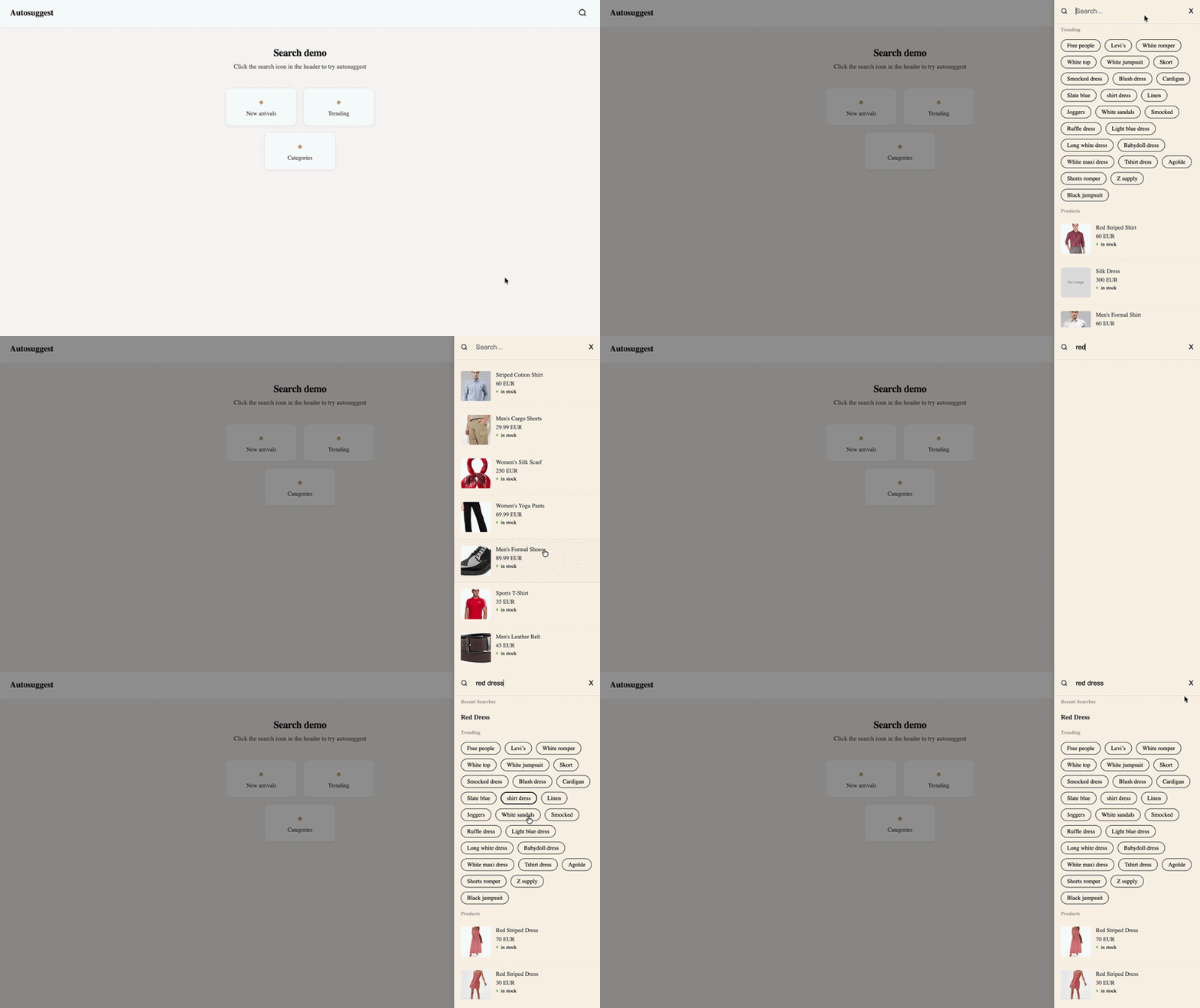
This use case demonstrates how to configure the Autosuggest JS SDK to display suggestions immediately when the search input gains focus.
By enabling initialRequest and trendingSearches, popular search terms are shown before the user begins typing, supporting early engagement and discovery.
Implementation Example
const autosuggest = new Autosuggest({
  siteKey: "your-site-key",
  apiKey: "your-api-key",

  inputBoxConfigs: {
    searchInput: ".search-input",
    debounceDelay: 300,
    minChars: 2,
  },

  suggestionBoxConfigs: {
    containerTag: "div",
    attributes: {
      class: ["unbxd-autosuggest-box"],
    },
    template: MyCustomTemplate,
  },

  apiConfigs: {
    apiEndpoint: "https://search.unbxd.io",
    initialRequest: true,
    trendingSearches: { count: 8 },
    topQueries: { count: 4 },
    keywordSuggestions: { count: 3 },
    inFields: { count: 2 },
    popularProducts: { count: 2, fields: [] },
    promotedSuggestions: { count: 2 },
  },

  onEvent: ({ eventType }) => {
    console.log("Autosuggest event:", eventType);
  },
});
Use Case 2: Initial Request Enabled with Trending Searches Disabled
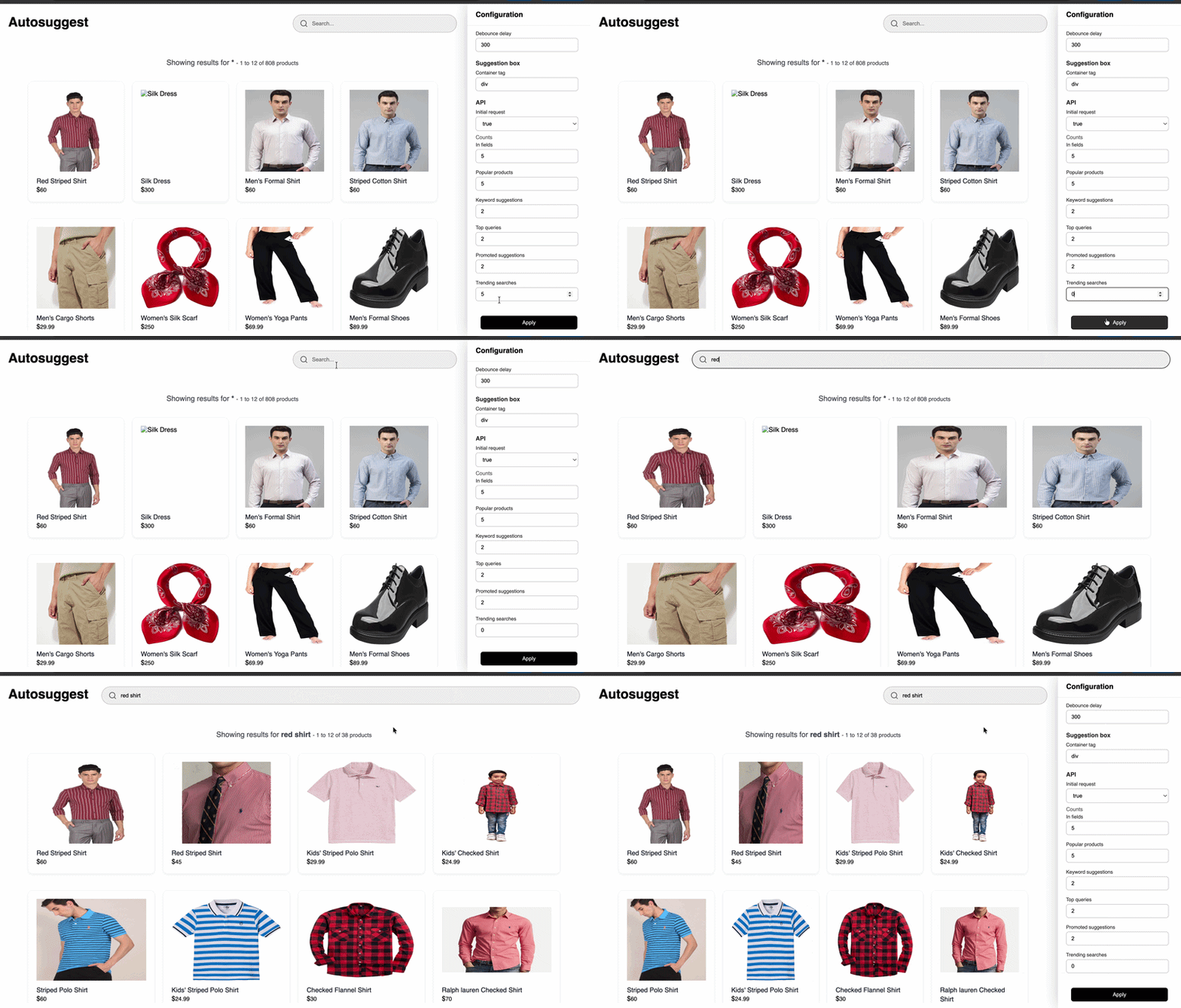
Demonstrates triggering suggestions on input focus without trending searches. With initialRequest enabled and trendingSearches disabled, only the configured suggestion types are returned.
Implementation Example
const autosuggest = new Autosuggest({
  siteKey: "your-site-key",
  apiKey: "your-api-key",

  inputBoxConfigs: {
    searchInput: ".search-input",
    debounceDelay: 300,
    minChars: 2,
  },

  suggestionBoxConfigs: {
    containerTag: "div",
    attributes: {
      class: ["unbxd-autosuggest-box"],
    },
    template: MyCustomTemplate,
  },

  apiConfigs: {
    apiEndpoint: "https://search.unbxd.io",
    initialRequest: true,
    trendingSearches: { count: 0 },
    topQueries: { count: 5 },
    keywordSuggestions: { count: 3 },
    inFields: { count: 2 },
    popularProducts: { count: 2, fields: [] },
    promotedSuggestions: { count: 2 },
  },

  onEvent: ({ eventType }) => {
    console.log("Autosuggest event:", eventType);
  },
});
Custom Template Implementation
The following example demonstrates a custom autosuggest template used in this use case.
It renders suggestions, trending searches, and popular products in a structured layout.
import CustomPopularProducts from "./popularProducts.js";
import CustomSuggestionsBox from "./suggestionsBox.js";
import CustomTrendingQueries from "./trendingQueries.js";

function CustomAutoSuggestionBox(props) {
  const {
    query,
    response: {
      inFields = [],
      keywordSuggestions = [],
      promotedSuggestions = [],
      topSearchQueries = [],
      trendingSearches = [],
      popularProducts = [],
      initialRequestProducts = []
    } = {}
  } = props;

  const products =
    popularProducts.length > 0
      ? popularProducts
      : initialRequestProducts || [];

  const suggestionsFields = [
    { title: "Recent Searches", items: inFields },
    { title: "Suggestions", items: keywordSuggestions },
    { title: "Promoted Suggestions", items: promotedSuggestions },
    { title: "Top Search Queries", items: topSearchQueries },
  ];

  const trendingHTML = trendingSearches?.length
    ? `<div class="unbxd-autosuggest-box-trending-searches">
         ${CustomTrendingQueries(trendingSearches)}
       </div>`
    : "";

  const isSuggestions =
    inFields?.length > 0 ||
    keywordSuggestions?.length > 0 ||
    promotedSuggestions?.length > 0 ||
    topSearchQueries?.length > 0;

  const suggestionsHTML = isSuggestions
    ? `<div class="unx-suggestions">
         ${CustomSuggestionsBox(suggestionsFields, query)}
       </div>`
    : "";

  const suggestionsAndTrendingHTML =
    isSuggestions || trendingSearches?.length > 0
      ? `<div class="unx-suggestions-and-trending-searches">
           ${suggestionsHTML}
           ${trendingHTML}
         </div>`
      : "";

  return `
    <div class="unbxd-auto-suggestion-box">
      ${suggestionsAndTrendingHTML}
      <div class="unbxd-autosuggest-box-right-column">
        <div class="unbxd-autosuggest-box-popular-products-section">
          Products
        </div>
        ${CustomPopularProducts(products)}
      </div>
    </div>
  `;
}

export default CustomAutoSuggestionBox;
Note:
CustomPopularProducts,CustomSuggestionsBox, andCustomTrendingQueriesare helper modules responsible for rendering specific sections of the autosuggest UI. Their implementations can be customized based on your design requirements.